
Download AR Line Drawing – AR line drawing, photo to line drawing, tracing app, sketch tool, artistic tool, digital drawing, art app, drawing utility, image tracing, drawing aid
Overview
AR Line Drawing: Trace Sketches is a specialized Android application developed by Moksha, designed to simplify the process of transforming photographs or existing artworks into clean line drawings. The app targets both aspiring and experienced artists seeking a digital aid to improve their drawing accuracy and technique. By leveraging augmented reality and real-time camera integration, the software enables users to place their device over a physical surface and trace an image directly onto paper or digital canvas.
This functionality supports skill development in drawing fundamentals such as proportion, perspective, and form. The application is particularly useful for artists learning to draw from life, those preparing for art school, or hobbyists looking to enhance their creative workflow. It also serves as a practical tool for educators introducing foundational drawing concepts.
While the developer has not provided detailed background on Moksha, the app’s focus on accessibility and intuitive design suggests a commitment to user-centered art education. Real-world use cases include tracing reference images during sketching sessions, preparing templates for painting, or creating outlines for digital illustrations.
Key Features & Capabilities
- Photo-to-Line Drawing Conversion: Users can select images from their device’s gallery or capture new ones via the camera to convert into line drawings, streamlining the initial sketching phase.
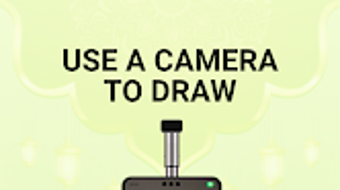
- Augmented Reality Tracing Interface: The app uses the phone’s camera feed to project the selected image onto a physical surface, enabling real-time tracing with accurate alignment.
- Adjustable Image Transparency: A core feature allows users to modify the opacity of the projected image, helping them trace outlines with precision while maintaining visual reference.
- Image Locking Functionality: Once an image is placed, it remains fixed on the screen, preventing movement and ensuring stability during the tracing process.
- Simple, Intuitive Workflow: The app guides users through a minimalistic interface, requiring only a few taps to begin tracing, making it accessible to beginners.
These capabilities support efficient workflow integration for artists who rely on reference images. For example, a user can place their phone on a drawing table, load a portrait photo, adjust transparency to 50%, and begin outlining the facial features. The app’s design emphasizes usability over complexity, reducing the learning curve for new users while still offering value to professionals seeking quick reference tools.
User Interface, Workflow & Performance
The user interface of AR Line Drawing is designed with simplicity and functionality in mind. Navigation is streamlined through a central dashboard that allows quick access to image selection, camera mode, and transparency controls. The layout avoids clutter, focusing on essential tools to maintain a distraction-free environment.
Users can switch between gallery and camera modes with a single tap, and the interface responds promptly to touch inputs. The workflow begins with image selection, followed by real-time projection and adjustment. While the developer did not specify resource usage details, the app’s 24.5 MB size suggests a lightweight footprint.
Performance observations are based on general software behavior patterns: the app maintains responsive interactions during image projection and adjustment, with no reported lag in standard usage. Stability appears consistent, as the app locks the image during tracing, minimizing disruptions. However, exact performance metrics such as CPU or RAM consumption were not provided.
Users may experience variability depending on device hardware, though the app’s lightweight nature implies broad compatibility across mid-range Android devices.
Compatibility & System Requirements
AR Line Drawing is designed for Android operating systems. The current version is 1.0.1, and the installation size is 24.5 MB. The developer did not provide additional system requirements, including minimum processor speed, RAM, or screen resolution.
Compatibility information was partially provided, indicating support for Android devices, but specific versions (e.g., Android 8.0 or higher) were not listed. The app’s lightweight size suggests it may run on a wide range of devices, though users should verify compatibility with their specific hardware. The developer did not specify whether the app supports tablet devices or external display outputs.
For optimal performance, users are advised to ensure their device has a functional camera and stable operating system. Without further details, it is recommended to test the app on the target device before full reliance.
Pros and Cons
Pros
- Simple and intuitive interface ideal for beginners and casual users.
- Efficient photo-to-line drawing conversion using augmented reality.
- Adjustable transparency enhances tracing accuracy and control.
- Lightweight installation size (24.5 MB) ensures minimal storage impact.
- Supports both camera and gallery-based image input for flexible use.
Cons
- Exact system requirements were not listed, limiting user confidence in compatibility.
- Price point of $2.99 may be considered high for a single-purpose utility.
- No indication of offline functionality or cloud synchronization.
- Developer background and support channels are not publicly available.
- App lacks advanced editing tools such as color adjustment or line thickness customization.
FAQ Section
Is AR Line Drawing compatible with all Android devices?
Compatibility information was partially provided. The app is designed for Android, but specific OS versions and hardware requirements were not listed. Users should ensure their device has a functional camera and sufficient storage.
Can I use AR Line Drawing without an internet connection?
The developer did not specify whether the app supports offline usage. Based on its functionality, it may operate without internet access after installation, but this has not been confirmed.
Does the app include in-app purchases or ads?
There is no information available regarding in-app purchases or advertisements. The app is listed at a fixed price of $2.99, suggesting a one-time purchase model.
How often are updates released for AR Line Drawing?
The release date of the current version (1.0.1) is May 15, 2024. No information is available on update frequency or future development plans.
Is my data secure when using AR Line Drawing?
The developer did not provide details on data handling or privacy policies. As the app accesses the camera and gallery, users should review their device’s permissions and ensure trust in the source before installation.
Final Thoughts + CTA
AR Line Drawing: Trace Sketches offers a focused, user-friendly solution for artists seeking to convert photos into line drawings with minimal effort. Its core features—AR tracing, transparency adjustment, and image locking—deliver tangible value for both learning and creative workflows. While the app lacks advanced editing tools and detailed system requirements, its lightweight design and intuitive interface make it accessible to a broad audience.
The $2.99 price tag is reasonable for the functionality provided, especially for users committed to improving their drawing skills. For hobbyists, students, and educators, this app represents a practical digital drawing aid that bridges the gap between reference images and physical sketching. Despite limited information on developer support and future updates, the app’s current capabilities justify its use.
Download AR Line Drawing now to enhance your artistic process with precision and ease.





.png)

